
Pada Tutorial Blog Sebelumnya Saya Sudah Menjelaskan Pada sobat Tentang Bagaimana Cara Membuat Toolbar Atau Navbar Melayang Di Blog.Tapi Artikel Kali Ini Saya Hanya Sedikit Membagikan 125 Template Keren Untuk Blogger Dan Wordpress. Yg Saya Dapatkan Dari Berbagai Sumber...Semoga Sobat Semua Senang Dengan Template Yg Saya Share Dari Berbagai Sumber Ini.
This selection of free Blogger templates are colorful, beautiful or ornate and are guaranteed to make your blog have a strong visual impact.
1. Butterfly (Vector Three Column) by Blogger Tricks
I was so amazed to see this beautiful theme appear in my feed reader today! This is a stunningly beautiful template with three columns and icons beside important links.
Based on the original theme by Templates4all.com.
Demo | Download
2. Japanese Fleur by Blogger Tricks A simply stunning Wordpress conversion from the original design by Lorelei.3. Chasmogamous by Template GodownA simple but effective template with a left-hand sidebar.Demo | Download5. Freedom Wall by GosuBlogger
4. New Morning by GosuBlogger
A fresh and lively theme, converted from the original design by WP Free Themes.
Details and download
This distinctive two column template features integrated navigation tabs and a unique calendar style.
Demo | Download
6. Art Imagination by Jackbook
This vivid three column template was converted from the original Wordpress Theme and features a beautiful background image which would be ideal for artistic or feminine blogs.
Demo | Download
7. Astro by ThemeLib
A colorful and beautifully stylized template with an ethereal theme. Converted from the original WP theme which was designed by UnoDesignStudio.
Demo | Download
8. Glass by Blog and Web
A subtle two column theme, based on the original design by Free CSS Templates.
Demo | Download
9. Lemon Twist by Jackbook
This is a truly awesome template with many sections in the footer and stylized throughout. Converted from the original WP theme by Far From Fearless.
Demo | Download
10. Agenda 02 by Blogs Made in SpainA three column template with a notepad style appearance.
Demo | Download
11. Agenda 03 by Blogs Made in SpainThis template is styled like an artist's desk and is a wide two column layout.
Demo | Download
12. Agenda 04 by Blogs Made in SpainThis rustic theme is a two column design with a beautiful header image.
Demo | Download
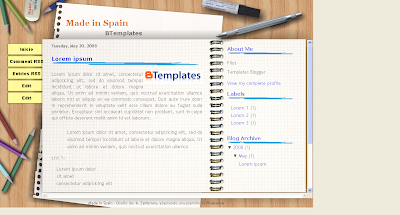
13. Made in Spain by Blogs Made in SpainOf all the notebook style templates I've seen, this is my favorite one of all :)
Demo | Download
14. Jonga by Layout for All
This two column template has an orange color scheme. Sorry there's no demo blog for this one, but from the screenshots it looks very good.
Download
15. Snow Crystals by El Blog de Lui
An unusual design with beautiful vector snowflakes, adapted from the template design by Free CSS Templates
Demo | Download
16. Vintage Style by Templates Para Novo BloggerThis tasteful theme is in hues of dark red.
Demo | Download
17. Capung by Template GodownThis single column template has a feminine appeal and is perfect for photobloggers. It includes a widgetized footer section for ads and other content, also a navigation bar for your important links.
Demo | Download
18. Florascent by Blogger Tricks
A beautiful blue toned theme with one sidebar to the left and floral design in the header.
Demo | Download
19. The Hobbit by Blogger Templates (Itmag)This beautiful template has an ethereal presence.
Demo | Download
20. Galera Curtindo by Emporium DigitalA bold three column theme with centralized navigation buttons beneath the header.
Demo | Download
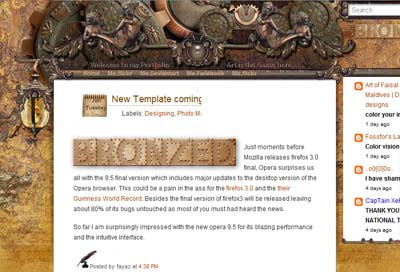
21. Bronzed by Testing GroundAn elaborate and original two column design.
Details and Download
22. Field of Dreams by Blogger Tricks
A truly stunning and colorful design with tabbed navigation in the header and a built in search function. Originally designed by NotSoBoringLife.
Demo | Download
23. Totally Lost by Our Blog Templates
Here is a great example of how beautiful imagery in the header can totally transform a basic design.
Details and Download
24. The Maldivian by Testing GroundAn elaborate fantasy theme with two sidebars to the right.
Details and download
25. Snail Blogger by Template Godown
Snail is an invigorating theme with split columns in the right hand sidebar. Converted with permission from the original design by Cinila.
Demo | Download
26. Cairo Concept by Testing Ground
A narrow, two column theme with a vivid header image.
Demo | Download
27. Sad Fish by ThemeLibA simple two column theme with an aquatic feel.
Demo | Download
28. Creation by Blogger TricksA beautiful theme which includes an integrated navigation bar and calendar icons. Based on the design originally by Ophelia Nicholson.
Demo | Download
29. Vector Lover by Blog and Web
How stylish is this theme? It features a two column layout with integrated search function, and is converted from the original template by Styleshout.
Demo | Download
30. Rainbow Garden by JackbookAn ornate and colorful three column template, based on the original design by Web Hosting Geeks.
Demo | Download
31. Assassins by Made in SpainA two column template themed on the popular video game, Assasin's Creed.
Demo | Download
32. DH Theme for Blogger by STRA MirageA stunning template which was converted from the original WP theme.
Demo | Download
Dark Templates
This selection of Blogger templates use a dark color scheme.
33. Dreamwork Redux by Jackbook
Stunning use of color and many great features make this one of the best dark Blogger templates I've ever seen. Based on the original design by Vinh Le.
Demo | Download
34. Graydient by AborregateA smooth dark design with pale area for the main blog content. I love the contrasting colors in the header logo which really sets this theme alight. Converted from the WP theme by Free WP Layouts.
Demo | Download
35. Funky Zine by Blogger Tricks
Adapted from the Wordpress theme by Chiq Montes, this dark design features a wide sidebar and integrated navigation links.
Demo | Download
36. Renewed by Ramdomness
This dark theme is based on the Minima template, but includes a much wider area for posts. Sidebar titles are highlighted in red, and the layout is hugely customizable.
Demo | Download
37. BT Dark Green by Blogger Buster and Blogging Tips
A wide two column theme with integrated navigation and search, plus mouseover effects in the sidebar. Converted from the Wordpress theme by Blogging Tips.
Demo | Download
38. Blue Greens by Our Blog TemplatesThis template makes stunning use of color contrasts and has a segmented footer for extra widgets.
Details and download
39. Dark World by akOOgle
A simple but professional dark template, ported from the original design by Hive Designs.
Demo | Download
40. Charcoal by Blogger TricksA stunning conversion from the original WP theme by Jinsona. Includes a navigation bar, built in feed and bookmark icons, and a wide posting column. Also available in three column format.
Demo | Download
41. Whale of a Time by Suck My Lolly
An original design with two column layout.
Demo | Download
42. Wiremesh by Abboregate
This dark two column theme highlights sidebar and title headings in vivid colors. Based on a design by Free CSS Templates.
Demo | Download
43. Macbook Pro by ThemeLib
A stylish dark template with three columns which is converted from the theme by Quality Wordpress. Perfect for Apple lovers!
Demo | Download
44. Zanblue by Blogger TricksA delicious dark theme with mouseover effects and stylish widgets. Based on the WP theme by Ophelia Nicholson.
Demo | Download
45. Elegant by Blogmundi
This three column layout is enhanced by the choices of color.
Demo | Download
46. Pepper by Blogger Tricks
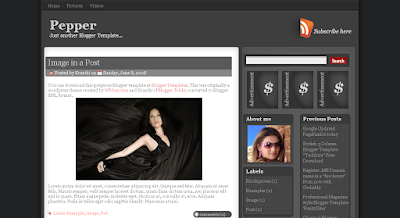
Kranthi has done an excellent job of converting this beautiful dark theme. It features an integrated search function and feed icon in the header, with spaces for ads and two sidebars on the right. Converted from the original design by Jinsona.
Demo | Download
46. Green Magic by ThemeLibThis two column template is very easy on the eyes, and includes navigation links and calendar widgets for post dates. Based on the original design by iWebNet.
Demo | Download
47. Architect by George Petsagourakis
An unassuming theme with plenty of options for customization.
Demo | Download
48. DFire by GosuBlogger
This narrow two column theme is remarkable. It features a great color scheme and stylized sidebar headings. Converted by the original theme by Dark Faery Tale.
Demo | Download
49. Signus by Templates Para Novo BloggerIn shades of gray with a vector style background.
Demo | Download
50. Graffiti Art by Blogger Tricks
An outstanding two column template with plenty of color. Ported for Blogger from the original design by WPGalaxy.
Demo | Download
51. Template RS10 by Templates Novo Blogger
A dark themed template with well styled navigation and segmented columns in the footer. Converted from the original design by ThemeLab.
Demo | Download
52. Clean Dark by Blogger Tricks
A three column template whcih features a highlighted sidebar to draw attention to important content.
Demo | Download
53. Urban Artist by Blog and Web
A delicious dark theme with a wide sidebar and many built in features.Based on the original template by Styleshout.
Demo | Download
54. Connexion by Blogger TricksA stylish cityscape theme with integrated navigation beneath the header. Based on the original theme for WP by Jinsona.
Demo | Download
55. Gabfire Maq by GosuBlogger
A three column theme with plenty of space for ads. Based on the original theme by Gabfire.
Demo | Download
56. Windows Vista by ThemeLib A stunning dark two column template, converted from the original WP theme by Themebin.Minimalist Templates
This style of template offers a simple, clean appearance with few (if any) images.
57. Honest Expressions by Aborregate
A professional style theme with two sidebars to the right of the main posts section. Based on a theme designed by Free WP Layouts.
Demo | Download
58. Addicted by Usario Compulsivo
A fresh inviting theme with three columns. Converted from the original theme by Darren Delaye.
Demo | Download
59. Minimalist E by Our Blog Templates
While this template may have a minimalist layout, I think the overall design is beautiful.
Details and download
60. Cool Calm Collected by BlogCrowds
The epitomy of minimalistic blog design!
Demo | Download
61. Complimentary by Aborregate
An exquisite template with mouseover effects.
Demo | Download
62. is_Simple by Blogmundi
A basic canvas on which you can impress your own customizations. This layout includes two sidebars to the right of the main column, and is very easy to use.
Demo | Download
63. Statement by Zona Cerebral
A fuss-free three column template with iconized links and integrated search function. Based on the original design by BlogOhBlog.
Note: Many pages on Zona Cerebral are currently unavailable, so I have linked to the mirror download location on BTemplates until the links are fixed.
Demo | Download
64. Enlight by Blog and Web
A fresh two column template with integrated navigation links.
Demo | Download
65. Red Planet by Jackbook
This minimalist design features an excellent choice of typography. It includes navigation links and an integrated search function. Based on the original theme by Free CSS Templates.
Demo | Download
66. Facebooked by GosuBlogger
Based on Justin Tadlock's excellent theme, Facebooked is a three column template in the style of this popular social networking site.
Demo | Download
68. Sederhana (Oh My Grid) by Template Godown
I love this three column, grid based theme which is based on Oh My Grid by Thomas at Orangescale. While using only monochrome colors for the overall layout, it becomes incredibly functional with the unique header layout, ads section and search function below the header. Be sure to check this one out for a truly professional and unique appearance for your blog!
Demo | Download
69. Genkit by GosuBlogger
This clean template has a fluid main posts column and a unique sliding tabbed navigation widget in the left hand side. Converted from the original theme by Ericulous.
Demo | Download
70. Clarity by GosuBlogger
Beautifully simple, this theme features a fluid layout which expands to fit the size of the reader's browser.
Demo | Download
Feminine Designs
Here is a selection of pretty feminine designs in various colors and styles.
71. We Heart Stuff by STRA Mirage
Feminine and flirty, this pink toned theme includes two columns with navigation beneath the header.
Demo | Download
72. Mae Mulher by Emporium Digital
A beautifully designed feminine theme with a two column layout.
Demo | Download
73. Heart Attack by Suck My Lolly
A simple blue theme with elaborate header.
Demo | Download
74. Thoughtlog by GosuBlogger
A three column design in shades of lilac. Converted from the Wordpress theme designed by Scribble Scratch.
Demo | Download
75. Marco by Templates Novo Blogger
A simple, professional and feminine theme.
Demo | Download
76. Summer Love by Blog Crowds
A beautiful two column template with a subtle floral theme.
Demo | Download
77. Mode Parisienne by Suck My Lolly
A fresh feminine theme in pale blue.
Demo | Download
78. Celebrity Blog by Blogger Templates (Itmag)
An excellent template for celebrity bloggers, though this could also be adapted for any feminine themes blog. Converted from the original theme by Red Planet Media
Demo | Download
79. Isabella by Templates Para Novo Blogger
The sidebars in this feminine layout are aligned beneath the vector image on the left.
Demo | Download
80. Shoe Fetish by Randomness
Pink and girly, this template would suit any shoe-lover! Converted from the Wordpress theme by Better in Pink.
Demo | Download
81. Bordados 01 by Blogs Made in SpainAn embroidery style template with pretty flowers and a butterfly in the header.
Demo | DownloadProfessional/Corporate Themes
Clean lines and effective layouts make these designs suitable for business and technical blogs.
82. TechJunkie by Blog and Web Simple and elegant, this template was converted from the original theme by StyleShout.83. Acuerdo by Blog and Web
An elegant two column theme with contrasting sidebar. Ported from the original theme by Just Skins.
Demo | Download
84. Blue Blog by Zona Cerebral A wide two column template with calendar widget and integrated search function. Converted from the original Wordpress theme by Kailoon.Demo | Download
85. Techlure by Blogger Tricks Based on the original theme by Padd IT Solutions, this three column template offers a fresh professional layout which is ideal for technology related blogs.
86. Adspress by Template Godown
A simple and professional theme with a built in navigation and search bar.
Demo | Download
87. Indomagz by GosuBlogger
This professional magazine style theme is based on the premium theme by Magznetwork.
Demo | Download
88. Business Blue by GosuBlogger
This three column theme is ideal for a technical or business blog. It includes integrated navigation links and a themed feed icon beneath the header.
Demo | Download
89. Love Blog by GosuBlogger
I like the modest style fo this wide two column theme which includes a navigation bar and integrated search. Based on the theme originally designed by ThaSlayer.
Demo | Download
90. Softlight by B-Themes
This graceful template uses a two column layout with tabs for important navigation links. Based on the WP design by MakeQuick.
Demo | Download
91. Techno by Blog and Web
This blue toned three column template has a technical feel. Based on the CSS template by Free CSS Templates
Demo | Download
92. Naranjo by Templates Para Novo Blogger
With rounded corners and a three column layout, this beautiful template is sure to be useful for any blog niche.
Demo | Download
93. Advanced Tech by Aborregate
A vibrant two column template converted from a theme by Free WP Layouts.
Demo | Download
94. Altruism by Abboregate
This simple two column layout is designed in hints of green. Based on the original design by Node33.
Demo | Download
95. Numerology by Aborregate
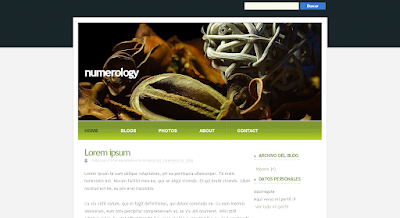
A jaw-dropping design with oversized header and great color scheme. Converted from a theme designed by Free CSS Templates.
Demo | Download
96. Keepsheep by Template GodownThis stylish two column layout includes an integrated search function and navigation bar. Based on the original design by Keedie.net.
Demo | Download
97. PassionDuo for Blogger by eBlog Templates
This ad-ready theme was originally designed by DesignSaurus for Daily Blog Tips, and has been converted for Blogger by eBlog Templates.
This theme features many spaces for ads and banners, and is fully widgetized. Please note: you must register a free account with eBlog Templates before you are able to download this theme.
Demo | Details
98. Happie by Blog Mundi
Bright colors help this three column theme to stand out.
Demo | Download
99. Dicas Blogger by DicasSimple but so functional, this template has a wide area and two columns below in the right hand sidebar.
Demo | Download
Magazine Style
The recent web design trend for magazine style layouts has found its place in the realm of Blogger template design. Here is a selection of some magazine style templates for Blogger.
100. Visionary Reloaded by Blogger Templates (Itmag)
Here is another template which will wow you! Based on Justin Tadlock's fabulous theme for Wordpress, this Blogger conversion includes everything you could expect from a magazine style template. To say I am impressed is an understatement!
Demo | Download
101. Template Tabs by Templates Para Voce
This layout features many different areas for widgets and comes complete with tabbed navigation in the wide sidebar.
Demo | Download
102. Revolution by AborregateIf you're at all interested in theme and web design, chances are you will have heard the name Brian Gardner before. This Blogger template is based on one of Gardner's most famous templates for Wordpress: Revolution. It includes a magazine style layout and translates almost perfectly for Blogger! Certainly a professional style theme to check out.
Demo | Download
103. Personal Mag by ThemeLib
Converted by the beautiful theme designed by WP Theme Designer, this excellent template features a wide layout with two sidebars on the right.
Demo | Download
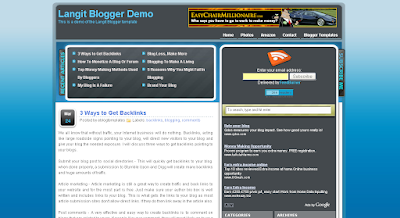
104. Langit by GosuBlogger
GosuBlogger uses this template for his own blog which proves this is an excellent design to use. I consider this a magazine style template as it includes many different areas for widgets and includes a navigation bar in the header.
Demo | Download
105. Nice! by Templates Para Voce
A simple magazine style theme with tabbed navigation above the main posts section.
Demo | DownloadLandscape/Cityscape
Thse Blogger templates feature a landscape or cityscape image in the header: an increasingly common trend in blog template design.
106. Isolation by Our Blog Templates
A striking landscape design with a wide sidebar to the right and integrated navigation.
Details and download
107. Greenery by Blog and WebA two column theme in shades of green. Ported from the original design by LEMONed.
Demo | Download
108. City Scape Theme by RandomnessThis outstanding dark theme features a sidebar to the left of the main column and stylized CSS for block quotations. Converted from the original theme by Tutorial Blog.
Demo | Download
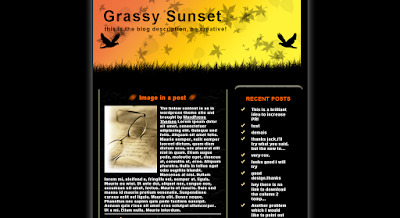
109. Grassy Sunset by Jackbook
A narrow two column template with a beautiful header.
Demo | Download
110. Las Vegas by El Blog de Lui
Features a stylish cityscape of Las Vegas beside the narrow header title. Adapted from a template by Free CSS Templates.
Demo | Download
111. Nitelife by Blogger Tricks
This urban theme is based on a design by Ophelia Nicholson, and features three columns with a stunning header image.
Demo | Download
112. A New Day by Blogger Buster
A wide two column theme with transparency across the header image.
Demo | Download
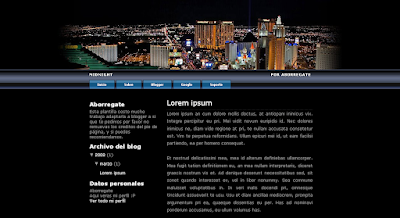
113. Midnight by AborregateA dark yet colorful cityscape theme, adapted from a design by Free CSS Templates.
Demo | Download
114. External by Our Blog Templates
A classic two column theme with three columns in the footer. Sorry there is no demo blog available for this template, but you can see the full layout on the download page in a full length screenshot.
DownloadMiscellaneous Designs
While these templates don't fit neatly into any of the other groups above, all are remarkable designs and deserve their place on this list!
115. Grungy by Blogmundi
The grunge style of modern web design is toned down in hues of blue.
Demo | Download
116. Birds on a Wire by RandomnessA fresh and simple theme which was converted from the WP template by Better In Pink.
Demo | Download
117. Natural Essence by GosuBlogger
This earthy toned design is simple and elegant.
Demo | Download
118. Vista Multi Style by Blogger Templates (Itmag)
Here is another jaw-dropping template which really must be seen in action.
Demo | Download
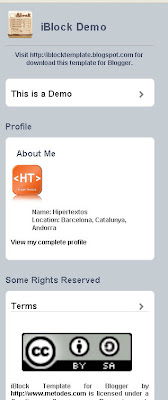
119. iBlock Template (for iPhone) by iBlock
This remarkable design is the first Blogger template specifically designed for viewing on the iPhone (or other handheld devices). There is also CSS for viewing in a desktop browser which can be downloaded from the iBlock site.
Demo | Download
120. Blanco Negro by Blogs Made in SpainA striking black and white template with two sidebars on the right.
Demo | Download
121. BookSmarts by Suck my Lolly
This simple three column template features a beautiful header image and sidebars to either side of the main posts column.
Demo | Download
122. Twitter Theme by GosuBlogger
Perfectly styled, this Twitter theme offers a clean and funky way to present your blog.
Demo | Download
123. Jeans Three Column by InfoCreek
A three column template with a denim style background and stylish headings.
Demo | Download
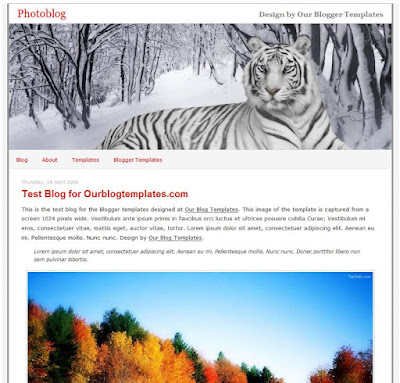
124. Photoblog by Our Blogger TemplatesA beautiful one column theme which is ideal for wide images.
Details and download
125. Communist by Blogger Tricks
Kranthi describes this as a niche template, though with a slight change to the image in the header, I'm sure this could be made suitable for almost any style of blog. I love the color scheme (red is one of my favorites to be seen in web design) and the clean lines make for a professional appearance. This template is based on the original design by Jinsona.
Demo | DownloadSEMOGA SOBAT DAPAT SENANG DENGAN APA YANG SAYA SHARE KAN KALI INI
125 Template Keren Untuk Blogger Dan Wordpress



















Cara Membuat Breadcrumbs Atau Menu Navigasi Di atas Artikel Posting Blog
Pada Tutorial Blog Sebelumnya Blog Sharing Ilmu Pengetahuan Sudah Menjelaskan Pada Sobat Tentang Bagaiman Cara Membuat Toolbar Atau Navbar Melayang Di Blog..Dan Pada Tutorial Yg Sama Juga Yaitu Tutorial Blog Saya Akan Menjelaskan Pad Sobat Tentang Bagaimana Cara Membuat Breadcrumbs Atau Menu Navigasi Di atas Artikel Posting Blog. Breadcrumbs Atau Menu Navigasi Di atas Artikel Posting Blog bisa membuat template kita lebih seo friendly, karena akan mempermudah search engine menemukan artikel-artikel kita. Navigasi ini di kenal dengan nama breadcrumb-navigation. Tidak hanya itu dengan adanya breadcrumb-navigation maka pembaca dapat dengan mudah melihat posisi artikel yang di baca serta mencari artikel dalam satu kategori. breadcrumb-navigation bisa di pasang pada template blogger dengan sedikit modifikasi templatenya, dengan begitu breadcrumb-navigation akan lebih mudah jika langsung di praktekkan.
Cara memasang breadcrumb navigation sebagai berikut:
- Login ke blogger.com
- Klik Tata Letak.
- Pilih tab Edit HTML
- Click Download Full Template and
please back up your template first.- Kemudian beri tanda centang
pada kotak kecil di samping
tulisan Expand Template Widget.- Silahkan cari kode ]]></b:skin>
- Copy lalu paste kode di bawah
- ini persis di atas kode ]]></b:skin>
.breadcrumbs {
padding:5px 5px 5px 0px;
margin: 0px 0px 15px 0px;
font-size:95%;
line-height: 1.4em;
border-bottom:3px double
#e6e4e3;
}
8. Silahkan cari kode berikut pada
template anda :
<div class='post hentry uncustomized-post-template'>
9. Copy lalu paste kode di bawah ini persis di bawah kode <div class='post hentry uncustomized-post-template'><b:if cond='data:blog.homepageUrl == data:blog.url'>
<b:else/>
<b:if cond='data:blog.pageType == "item"'>
<div class='breadcrumbs'>
Browse » <a expr:href='data:blog.homepageUrl' rel='tag'>Home</a>
<b:loop values='data:posts' var='post'>
<b:if cond='data:post.labels'>
<b:loop values='data:post.labels' var='label'>
<b:if cond='data:label.isLast == "true"'> »
<a expr:href='data:label.url' rel='tag'><data:label.name/></a>
</b:if>
» <span><data:post.title/></span>
</b:loop>
</b:if>
</b:loop>
</div>
</b:if>
<b:else/>
<b:if cond='data:blog.pageType == "archive"'>
<div class='breadcrumbs'>
Browse » <a expr:href='data:blog.homepageUrl'>Home</a> » Archives for <data:blog.pageName/>
</div>
</b:if>
<b:else/>
<b:if cond='data:navMessage'>
<div class='breadcrumbs'>
<data:navMessage/>
</div>
</b:if>
</b:if>
10. Kemudian Save Template.

Cara Membuat Toolbar Atau Navbar Melayang Di Blog
Pada Tutorial Blog Sebelumnya Saya Sudah Menjelaskan Pada Sobat Semua Tentang Cara Membuat Author Box Dibawah Postingan Blog.Dan Pada Tutorial Yang Sama Juga Yaitu Tutorial Blog,Blog Sharing Ilmu Pengetahuan Akan Menjelaskan Pada Sobat Tentang Bagaimana Cara Membuat Toolbar Atau Navbar Melayang Di Blog, Cara Memasang Toolbar Melayang Diatas Blog , Cara Memasang Navbar Melayang Di Blog ,atau Juga Keyword Lainnya Yg Tentu Dimengerti Oleh Para Search Engine Atau Pengeunjung Yg Ingin Mengetahui Banyak Informasi .Navbar Atau Toolbar Bertujuan Untuk Menghemat Tempat Karna Di Toolbar Yg Melayang Diatas Blog Tersebut Dapat Sobat Gunakan Sebagai Tempat Untuk Meletakan Twitter Sobat, Facebook Sobat,Widget amung.us , RSS FEED Widget Langganan Email.. Dan Yg Lain-Lainnya Tergantung Keinginan Sobat.Baiklah Saya Akan Menmulai Topik Bertia kita he..he.. maksud saya Topik Pembicaraan Kita. Gmabar Diatas Atau Diatas Bagian Pojok Samping Tersebut adalah Screen Shoot Yg Saya Ambil Di Blog Website Nokia Center.
Bila Sobat Semua Menginginkan Tolbar Atau Navbar Tersebut, Sobat Bisa Mengikuti Langkah-Langkah Berikut:
- Login Ke Aku "Blogger" Sobat
- Pada "Dasbor" Pilih Rancangan Kemudian Pilih "Edit HTML
- Letakan CSS Berikut Tepat Diatas Kode ]]></b:skin>
#tejanavbar{font-family:Comic Sans Ms;background:url(https://blogger.googleusercontent.com/img/b/R29vZ2xl/AVvXsEhLbYTkoU3OkHcXDE_V_qlVfohrD_KMkiI_ow93VBgIY4RTqQGJgbHLPONz19F4zm-95MgQebvsCm7ewo15pzFY5MIv0gP5OPDstoaPpdW2YpQ6khUOxET4W4YJb6HnOqSJdW_5zLLeE6_a/)repeat-x;(0,0,0, 0.80);border:1px solid #C0C0C0;padding:2px 0;z-index:999;top:0px;left:1px;right:1px;position:fixed;-moz-border-radius:10px;-webkit-border-radius:10px;}
#tejanavbar .left{float:left;text-align:center;font-size:11px;font-style:normal;font-weight:bold;color:white;padding:2px 10px;}
#tejanavbar .right{float:right;padding:0px 2px;cursor:url(https://blogger.googleusercontent.com/img/b/R29vZ2xl/AVvXsEgKJV90aHufMBesBia12bqEcSnIXCxGLfnUiDqYpDK_gzut96Ln2Nn7YfFf39kj05L6oHbuEAvvJkC57EdWPUVPsZuOLWBqrsPIft2JSrsy_jIhNEDSJ8wwBXCZxdInDQcJOSBOTSnop0g/s1600/Cursord.png), default}
#tejanavbar a{color:red;text-shadow: rgb(255, 255, 255) 0px 0px 10px, rgb(255, 255, 255) 0px 0px 10px, rgb(255, 255, 255) 0px 0px 10px, rgb(255, 255, 255) 0px 0px 20px;-moz-outline-style:none;}
#tejanavbar a:hover{color:white;text-shadow: rgb(255, 0, 0) 0px 0px 10px, rgb(255, 0, 0) 0px 0px 10px, rgb(255, 0, 0) 0px 0px 10px, rgb(255, 0, 0) 0px 0px 20px;border:0px;-moz-outline-style:none;cursor:url(https://blogger.googleusercontent.com/img/b/R29vZ2xl/AVvXsEgKJV90aHufMBesBia12bqEcSnIXCxGLfnUiDqYpDK_gzut96Ln2Nn7YfFf39kj05L6oHbuEAvvJkC57EdWPUVPsZuOLWBqrsPIft2JSrsy_jIhNEDSJ8wwBXCZxdInDQcJOSBOTSnop0g/s1600/Cursord.png), default}
4.Kemudian Letakan Script Berikut Tepat Dibawah Kode <body><div id='tejanavbar' style='position:fixed;'>
<span class='left'><IMG align='top' alt='0' height='20' onclick='window.open("http://tejahtc.blogspot.com/?sm=1");' src='https://blogger.googleusercontent.com/img/b/R29vZ2xl/AVvXsEhp5iHI5MAOCNWTcMcqhv34908PhQ4o82aW6Df6ArDfVUIUvE1KlHiASbT17IpFBH8jBskSWlIRdPJEX7cIDWfUhmanLnNXhyphenhyphenzTPJmyGxD2yOx6qxwJsc1E1pzezLGfNZ2dIe6bFGDhCJRA/s1600/tejaicon3232.png' width='26'/>
<span style='font-family:kristen itc;'><blink>"WELCOME TO MY BLOG"</blink></span></span>
<span class='right' style='font-family:verdana;'>
<IMG alt='1' height='20' onclick='window.open("http://www.facebook.com/pages/Sharing-Ilmu-pengetahuan/125513924175946");' src='https://lh4.googleusercontent.com/_GaKwmMcf4N4/TSPPQiZKc2I/AAAAAAAAEDU/zD_grWbBNuQ/DADnfb.png' title='Facebook Page' width='20'/>
<IMG alt='2' height='20' onclick='window.open("http://www.facebook.com/pages/Sharing-Ilmu-pengetahuan/125513924175946");' src='https://lh4.googleusercontent.com/_GaKwmMcf4N4/TSPPJwm1nBI/AAAAAAAAEDM/UMIdfmgbSII/DADnbookmark.png' title='My Favorites' width='20'/>
<IMG align='top' alt='3' height='20' onclick='this.setHomePage(http://websitenokia.blogspot.com/);' src='https://lh4.googleusercontent.com/_GaKwmMcf4N4/TSPPQsgWT1I/AAAAAAAAEDc/-8SnRmd2RvQ/DADnhome.png' title='Set As HomePage' width='20'/>
<IMG align='top' alt='4' height='20' onclick='window.open("http://id-id.facebook.com/msuteja");' src='https://blogger.googleusercontent.com/img/b/R29vZ2xl/AVvXsEhgqz1D-AWy6o2GB64G73m3rByRqHlrlCwzTv8rPiLHloM_jCRiJ65Ce-Vw7rSZaMdx4iSa6IlnRkr2M5WYzG7idQkRWbVxtxSFHU6BCN8F0BKKtrDd5qD21AjCMgNu7bruWdu4dk8W95Np/s1600/facebook.png' title='Add Me On Facebook' width='20'/></span></div>
5.Simpan TemplatenyaSELAMAT MENCOBASEMOGA BERHASIL

Cara Membuat Author Box Di Bawah Postingan Blog
Pada Tutorial Blog Sebelumnya Saya Sudah Menjelaskan Tentang Bagaimana Cara Membuat Menu Drop Down Horizontal Dibawah Header. Dan Pada Tutorial Yg Sama Juga Yaitu Tutorial Blog.Saya Akan Menjelaskan Pada Sobat Tentang Bagaimana Cara Membuat Author Box Dibawah Postingan Blog,Atau Cara Membuat Author Dibawah Postingan,Atau Juga Keyword Sejenis Lainnya Yg Dapt Mudah Dipahami Oleh Pengunjugn Yg Akan Menuju Blog Ini.Author Box Ini Bertujuan Agar Pengunjung Mengetahui Siapa Penulis Artikel Yg Ada Di Blog Sobat Semua..Asal Sobat Ketahui Di Blog Saya Yaitu Blog Sharing Ilmu Pengetahuan Dan Juga Website Nokia Center, Juga Memasang Atau Membuat Author Dibawah Postingan .Kalau Sobat Tidak Percaya,.sobat Bisa Melihat Pas Dibawah Artikel Ini Ada About Authornya.Atau Juga Sobat Bisa Melihat Gambar Yg Ada Disamping Artikel Ini.
Jika Sobat Berkenan Memasangnya Sobat Bisa Mengikuti Langkah-Langkah Berikut:
- Login Ke Akun Blogger Sobat
- Pada Dasbor Pilih Rancangan --> Edit HTML Dan Jangan Lupa Untuk Centang Kolom Expand Template Widget
- Letakan Kode Berikut Tepat Diatas Kode ]]></b:skin>
.teja{background:#000;margin:20px 0 40px 0;padding:10px;overflow:auto;color:#fff}
.teja p{margin:0;padding:0}.teja a{color:#FFF}
.teja img{background:url(https://blogger.googleusercontent.com/img/b/R29vZ2xl/AVvXsEi_baELIfX00rMoR7KQEwMF2rEjxTFRX5LJIvPOKiI-vc1vP4w3LEn1Ve6vYrVVMkTHFR4l-3XuRVIb5_9EglENYToF5CADZ4w1kFypWhW-yvXK97Y7Pr6Xt7ptpmSFK08GR_QaPu46gz-N/s1600/bg-img-auhtor.gif)no-repeat;float:Left;margin:0 10px 0 0;padding:4px}
4. Cari Kode <div class='post-footer-line post-footer-line-1'> Agar Memudahkan Pencarian Gunakan CTRL F Atau F3
5.Letakan Kode Berikut Tepat Dibawah Kode <div class='post-footer-line post-footer-line-1'><b:if cond='data:blog.pageType == "item"'>
<div class='teja'>
<p><img alt='' class='avatar avatar-70 photo' height='130' src='https://blogger.googleusercontent.com/img/b/R29vZ2xl/AVvXsEgTuGZQz9uds_tOYYYvGbwk2oVVpUnON9_u8zMWMTHnmQj-RNmVj6MGMeVRPdGK_1y16sobOX8V0GyoYZlB1ZiRVbJ7s__plRF4IgnwF3HhSIRdRJiS3piaoM60ghJNo1gLtQQsIEg0ZHXe/s1600/author.png' width='100'/><div style='font-family: kristen itc; color: rgb(255, 0, 0);'><b>ABOUT THE AUTHOR</b></div>
<div style='text-align: justify; font-family:bedizen'><a href='http://tejahtc.blogspot.com/' target='new'><b>M.SUTEJA : </b></a>Saya semakin yakin bahwa hidup adalah 10 persen dari apa yang sebenarnya terjadi pada diri kita,dan 90 persen adalah bagaimana sikap kita menghadapinya
</div></p>
</div>
</b:if>
6.Simpan Templatenya
CATATAN: Sobat Bisa Mengubah Url Gambar Yg Berwarna Merah Dengan Url Gambar Sobat
Dan Ubah kata kata Yg Berwarna Hijau Dennga Kata kata sobat sendiri~~Selamat Mencoba~~~~Semoga Berhasil~~

Cara Membuat Pas Foto Sendiri Dengan Photoshop
Pada Tutorial Photoshop Sebelumnya Saya Sudah Menjelaskan Tentang Bagaimana Cara Membuat Jenggot dan Kumis Dengan Photoshop . Dan Pada Tutorial Yang Sama Juga Yaitu Tutorial Photoshop Saya Akan Menjelaskan Pada Sobat Tentang Bagaimana Cara Membuat Pas Foto Sendiri Dengan Photoshop..Bagi Sobat Yg Belum Pernah Menggunakannya Saya Akan Menjelaskan Pada Sobat Tentang Apa Itu Photoshop? Photoshop Adalah Softwtare Desain Yang Hebat Karna Software Tersebut Dapat Mengubah Atau Membuat Gambar atau Photo Menjadi Apa Saja Yg Kita Inginkan Salah Satunya Adalah Membuat Pas Foto ,.. Membuat Pas Foto Dengan Photoshop Sangatlah Mudah Karna Tidak Perlu Waktu 5 Menit Untuk Menyelesaikannya. Sobat Ingin Membuktikannya .. Silakan Sobat Ikuti Langkah Langkah Berikut:
buka foto nya di Adobe Photoshop, terus crop 4×6 Gunakan Polygonal Lasso tool untuk seleksi foto yang mau diambil.. Zoom fotonya biar hasilnya bagus.. ini butuh ketelitian.
hasinya musti gini yaa… yang saya malah blepotan… ayo kalahkan saya… ! hehehe.. punya kamu pasti lebih rapi.. Setelah seleksi selesai.. Duplikasi background layer dengan mendrag ke bawah (tombol create new layer). Terus hapus Background layer nya.
 Sekarang kita Inverse selection . Klik Select > Inverse. jadi sekarang yang ke seleksi background nya bukan orang nya.
terus perhalus pinggirnya dengan feather. Select > Feather kasih radius 1.
Delete deh background nya.. hasilnya seperti ini… Tekan ctrl + D untuk menghilangkan seleksi.
Sekarang tinggal buat background nya…
klik Create new layer lalu pindahkan layer baru ke bawah background copy.seperti gambar. Abis gitu Klik gradient setting warna nya, kalo gak salah warna pasfoto kan biasanya merah ati gitu kan.. kalo kurang oke, coba-coba aja yaa.. salah.. yaa tinggal UNDO aja.. hehehe..
 tarik gradient dari tengah mata ke atas.. biar keliatan ada bias cahaya dikit dari belakang. (posisi kursor ada di layer 1, bukan di background copy. jadi deh..tapi kayaknya kurang halus yaa gambarnya.. pake Erase tool settingannya dirubah ke ”Airbrush Soft Round”. trus Pindahkan kursor ke Layer Backround copy. trus hapus pinggirnya dikit-dikit.. yang rapi yaa..kalo masih kurang puas.. atau cahayanya kurang pas.. bisa Klik Image > Adjusment > Brigthness & Contras.. atur-atur disana sampe kira-kira cahaya nya pas.
kira -kira jadinya nanti seperti ini nih…
save as deh di format JPG..atau psd buat cadangannya.SELAMAT MENCOBA
Source: Ilmu Photoshop


Cara Membuat Jenggot dan Kumis Dengan Photoshop
Mari Sobat Ikuti Langkah Langkah Berikut:pertama buka photo yang mau dijenggotin.. Setelah itu klik brush tool atau tekan tombol B , lalu klik windows brushes atau tekan F5.DI Brushes windows setting seperti dibawah :Master Diameter nya sesuaikan dengan gambar aja.. soalnya, mungkin kamu pake gambar yang resolusi atau ukurannya gede.. maka si master diameternya juga harus gede.. nanti coba2 aja yaa..Klik shape dinamics di brushes palette , setting seperti dibawah :
diteruskan dengan Scattering , setting seperti dibawah :Terakhir setting Color dynamics seperti dibawah :Jangan lupa, sesuaikan warna brushes dengan rambut kepala, supaya bener-bener mirip :Klik eye drop tool terus klik foreground color klik di rambutnya.. trus klik background color, klik lagi rambut nya..Setelah beres semua… sekarang buat new layer untuk ngelukis jenggotnya..Klik brush tool lagi.. lalu lukis jenggot dan kumis pada tempatnya … ya iya lah !Hasilnya :Contoh Hasilnya LainnyaBagus Kan Jadinya ..he.he...heSELAMAT MENCOBA,SEMOGA BERHASIL


Langganan:
Postingan (Atom)
